ProceduralComponents are the building blocks of generation systems in the Infinity Engine. This tutorial will guide you through creating a complete custom component from initial setup to integration with the Infinity Creator.
What We'll Build
We'll create a Deformable Sphere component that:
- Generates a UV sphere mesh with configurable subdivisions
- Applies noise-based deformation for organic variation
- Demonstrates input/output handling, randomization, and mesh generation
- Can be used in visual systems within the Creator
Prerequisites
Step 1: Generate Component Template
The Infinity SDK includes a powerful infinity_tool utility that automatically generates all the necessary files for a new component. This saves time and ensures proper structure.
Additionally, the Infinity Creator makes creating new components easy. It has a built-in UI that calls the infinity_tool to help create components easily.
Using the Infinity Creator to create Procedural Components
- Open the Infinity Creator
- Navigate to Component Menu
- Click "Component" in the menu bar
- Select "Create Procedural Component..."
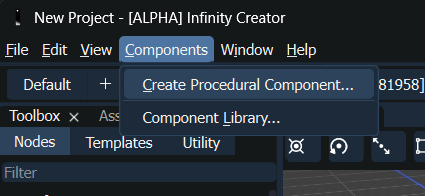
Click 'Create Procedural Component...' in the Components menu
Fill out the relevant UI fields as follows:
- Name: "Deformable Sphere"
- Group: "Tutorial.Components"
- Class Name: "DeformableSphere"
- Path: "path/to/MyDeformableSphere" <– Set this to a folder you want the development files to be generated
Click Create.
Using infinity_tool to create Procedural Components
Open a terminal/command prompt and run:
# Create component in a new directory
infinity_tool component create -n "Deformable Sphere" -g "Tutorial.Components" -c "DeformableSphere" -p "path/to/MyDeformableSphere"
# On Windows:
infinity_tool.exe component create -n "Deformable Sphere" -g "Tutorial.Components" -c "DeformableSphere" -p "C:\MyProjects\MyDeformableSphere"
Set the path argument (-p) to a folder you want the development files to be generated.
Parameters:
-n : Component name (e.g., "Deformable Sphere", "Terrain Generator")-g : Group namespace (e.g., "Tutorial.Components", "MyCompany.Tools")-c : Component classname (e.g., "DeformableSphere", "TerrainGenerator"). Should have no spaces, or special symbols.
-p : Path to create the component (directory will be created if it doesn't exist)
Generated Project Structure
The tool creates this complete project structure:
MyDeformableSphere/
├── CMakeLists.txt # Main build configuration
├── DeformableSphere.yaml # Component metadata and interface
├── PluginManifest.yaml # Plugin manifest (for multi-component plugins)
├── DeformableSphere_icon.svg # Default component icon
├── README.md # Basic documentation
├── src/
│ ├── DeformableSphere.hpp # Component header
│ └── DeformableSphere.cpp # Component implementation
└── test/
├── CMakeLists.txt # Test build configuration
├── DeformableSphereTestCase.hpp # Test case header
├── DeformableSphereTestCase.cpp # Test case implementation
└── main.cpp # Test runner
All files are generated with proper boilerplate code, saving significant setup time!
Step 2: Understanding Generated Files
Generated CMakeLists.txt
The generated CMakeLists.txt provides a complete, professional build configuration:
cmake_minimum_required(VERSION 3.23 FATAL_ERROR)
project(ComponentTemplate
VERSION 1.0.0
LANGUAGES CXX)
set(CMAKE_CXX_STANDARD 20)
set(CMAKE_CXX_STANDARD_REQUIRED True)
find_package(infinity REQUIRED)
include(GNUInstallDirs)
# Platform-specific optimizations
if(WIN32)
set(CMAKE_CXX_FLAGS "/DWIN32 /D_WINDOWS /EHsc /MP /Zc:__cplusplus")
# Debug symbols configuration for easier debugging...
endif(WIN32)
if (APPLE)
set(CMAKE_CXX_FLAGS "${CMAKE_CXX_FLAGS} -std=c++20 -O3")
endif(APPLE)
# Auto-generate plugin registration code
find_package(infinity_tool REQUIRED)
get_target_property(infinity_tool_binary Infinity::infinity_tool LOCATION)
execute_process(
COMMAND ${infinity_tool_binary} plugin generate-code
${CMAKE_CURRENT_SOURCE_DIR}/PluginManifest.yaml
ComponentTemplate
${CMAKE_CURRENT_SOURCE_DIR}/src/plugin
)
# Component library with auto-generated plugin code
add_library(ComponentTemplate SHARED
src/ComponentTemplate.cpp
src/plugin/Plugin_generated.cpp # Auto-generated registration
)
target_link_libraries(ComponentTemplate
PRIVATE Infinity::infinity
)
# Complete installation setup for distribution
install(FILES ComponentTemplate.yaml PluginManifest.yaml
DESTINATION ComponentTemplate/${CMAKE_INSTALL_DATAROOTDIR})
install(TARGETS ComponentTemplate
RUNTIME DESTINATION ComponentTemplate/${CMAKE_INSTALL_BINDIR}
LIBRARY DESTINATION ComponentTemplate/${CMAKE_INSTALL_LIBDIR})
Key Features:
- Auto-generated plugin code: Handles component registration automatically
- Cross-platform optimization: Windows, macOS, and Linux specific settings
- Professional installation: Proper CMake installation targets
- Debug support: PDB files on Windows, optimized debug symbols
Understanding Auto-Generated Plugin Code
The infinity_tool automatically generates plugin registration code in src/plugin/Plugin_generated.cpp and src/plugin/Plugin_generated.hpp. This code handles:
- Component registration with the Infinity Engine component registry
- Plugin lifecycle management (load/unload)
- Metadata integration from your YAML files
- Cross-language bindings (when C# support is enabled)
You don't need to write any registration code manually - the tool handles everything based on your PluginManifest.yaml and component YAML files.
Generated Component Interface
The DeformableSphere.yaml file contains the basic component interface that you'll customize:
---
name: Deformable Sphere
group: Tutorial.Components
author:
email:
version: [1, 0, 0]
description: "Deformable Sphere component description"
plugin-name: Tutorial.Components.DeformableSphere
defaultExecutionPolicy: MultiThreaded
in:
- name: Input1
type: float
description: Example input parameter
out:
- name: Output1
type: float
description: Example output parameter
Step 3: Customize Component Metadata
Update the generated DeformableSphere.yaml with our specific interface:
---
name: Deformable Sphere
group: Tutorial.Components
author: Your Name
email: your.email@domain.com
version: [1, 0, 0]
description: "Generates a deformable sphere with noise-based surface variation"
plugin-name: Tutorial.Components.DeformableSphere
defaultExecutionPolicy: MultiThreaded
in:
- name: Subdivisions
type: int
default: 4
description: Number of subdivisions for sphere tessellation (higher = smoother)
- name: Scale
type: float
default: 1.0
description: Base scale of the sphere
- name: DeformStrength
type: float
default: 0.2
description: Intensity of noise-based deformation (0.0 = none, 1.0 = strong)
- name: NoiseFrequency
type: float
default: 2.0
description: Frequency of deformation noise pattern
out:
- name: Mesh
type: Mesh
description: Generated deformable sphere mesh
- name: VertexCount
type: int
description: Number of vertices in the generated mesh
Step 4: Implement Component Logic
Update the Generated Header
The generated src/DeformableSphere.hpp contains basic structure. Update it with our specific methods:
#pragma once
#include <Infinity/Procedural/ProceduralComponent.hpp>
#include <Infinity/Procedural/ProceduralComponentDescription.hpp>
#include <Infinity/Types/Rendering/Mesh.hpp>
#include <Infinity/Types/Math/Vector3.hpp>
#include <Infinity/Types/Containers/Array.hpp>
#include <Infinity/Engine/PRNGDistribution.hpp>
{
public:
~DeformableSphere();
private:
void generateBaseSphere(int subdivisions, float scale,
float strength, float frequency);
};
Description and configuration data for a ProceduralComponent instance.
Definition ProceduralComponentDescription.hpp:48
Base class for procedural generation components.
Definition ProceduralComponent.hpp:73
virtual void execute()=0
Executes the component's procedural generation logic.
Complete 3D geometry definition with vertices, indices, and material partitioning.
Definition Mesh.hpp:135
Step 4: Component Implementation
src/DeformableSphere.cpp
#include "DeformableSphere.hpp"
#include <Infinity/Types/All.hpp>
#include <Infinity/Engine/PRNGDistribution.hpp>
#include <cmath>
#include <algorithm>
{
logInfo("DeformableSphere component initialized");
}
DeformableSphere::~DeformableSphere()
{
}
void DeformableSphere::execute()
{
int subdivisions = getIn<int>("Subdivisions");
float scale = getIn<float>("Scale");
float deformStrength = getIn<float>("DeformStrength");
float noiseFrequency = getIn<float>("NoiseFrequency");
subdivisions = std::max(2, subdivisions);
scale = std::max(0.1f, scale);
deformStrength = std::clamp(deformStrength, 0.0f, 2.0f);
logInfo("Generating sphere: subdivisions=" + std::to_string(subdivisions) +
", scale=" + std::to_string(scale));
generateBaseSphere(subdivisions, scale, mesh);
if (deformStrength > 0.001f) {
applyNoiseDeformation(mesh, deformStrength, noiseFrequency);
recalculateNormals(mesh);
}
setOut<Mesh>("Mesh", std::move(mesh));
setOut<int>("VertexCount", vertexCount);
logInfo("Generated deformable sphere with " + std::to_string(vertexCount) + " vertices");
}
void DeformableSphere::generateBaseSphere(
int subdivisions,
float scale,
Mesh& mesh)
{
const float PI = 3.14159265358979323846f;
const size_t numLat = subdivisions;
const size_t numLon = subdivisions * 2;
const float halfScale = scale * 0.5f;
const size_t numVertices = (numLat - 1) * numLon + 2;
const size_t numTriangles = numLon * 2 + (numLat - 2) * numLon * 2;
vertexBuffer.normals.resize(numVertices);
vertexBuffer.uvs.resize(numVertices);
IndexBuffer indexBuffer(0, IndexBuffer::IndexType::UInt32, IndexBuffer::Topology::Triangles);
indexBuffer.reserve(numTriangles * 3);
size_t vertexIndex = 0;
vertexBuffer.positions[vertexIndex] =
Vector3(0.0f, halfScale, 0.0f);
vertexBuffer.normals[vertexIndex] =
Vector3(0.0f, 1.0f, 0.0f);
vertexBuffer.uvs[vertexIndex] =
Vector2(0.5f, 1.0f);
vertexIndex++;
for (size_t lat = 1; lat < numLat; ++lat) {
float theta = lat *
PI / numLat;
float sinTheta = std::sin(theta);
float cosTheta = std::cos(theta);
for (size_t lon = 0; lon < numLon; ++lon) {
float phi = lon * 2.0f *
PI / numLon;
float sinPhi = std::sin(phi);
float cosPhi = std::cos(phi);
float x = sinTheta * cosPhi;
float y = cosTheta;
float z = sinTheta * sinPhi;
vertexBuffer.positions[vertexIndex] =
Vector3(x * halfScale, y * halfScale, z * halfScale);
vertexBuffer.normals[vertexIndex] =
Vector3(x, y, z);
vertexBuffer.uvs[vertexIndex] =
Vector2(
static_cast<float>(lon) / numLon,
1.0f - static_cast<float>(lat) / numLat);
vertexIndex++;
}
}
vertexBuffer.positions[vertexIndex] =
Vector3(0.0f, -halfScale, 0.0f);
vertexBuffer.normals[vertexIndex] =
Vector3(0.0f, -1.0f, 0.0f);
vertexBuffer.uvs[vertexIndex] =
Vector2(0.5f, 0.0f);
for (size_t lon = 0; lon < numLon; ++lon) {
indexBuffer.pushTriangle(
0,
static_cast<uint32_t>((lon + 1) % numLon + 1),
static_cast<uint32_t>(lon + 1)
);
}
for (size_t lat = 0; lat < numLat - 2; ++lat) {
size_t currentRow = lat * numLon + 1;
size_t nextRow = (lat + 1) * numLon + 1;
for (size_t lon = 0; lon < numLon; ++lon) {
size_t nextLon = (lon + 1) % numLon;
indexBuffer.pushTriangle(
static_cast<uint32_t>(currentRow + lon),
static_cast<uint32_t>(currentRow + nextLon),
static_cast<uint32_t>(nextRow + lon)
);
indexBuffer.pushTriangle(
static_cast<uint32_t>(nextRow + lon),
static_cast<uint32_t>(currentRow + nextLon),
static_cast<uint32_t>(nextRow + nextLon)
);
}
}
size_t southPoleIndex = numVertices - 1;
size_t lastRow = (numLat - 2) * numLon + 1;
for (size_t lon = 0; lon < numLon; ++lon) {
indexBuffer.pushTriangle(
static_cast<uint32_t>(southPoleIndex),
static_cast<uint32_t>(lastRow + lon),
static_cast<uint32_t>(lastRow + (lon + 1) % numLon)
);
}
mesh =
Mesh(vertexBuffer, indexBuffer, {});
}
void DeformableSphere::applyNoiseDeformation(
Mesh& mesh,
float strength,
float frequency)
{
for (size_t i = 0; i < vertices.size(); ++i) {
const Vector3& normal = normals[i];
float noise = 0.0f;
float amplitude = 1.0f;
Vector3 samplePos = pos * frequency;
for (int octave = 0; octave < 3; ++octave) {
uint32_t hash = static_cast<uint32_t>(
std::abs(
static_cast<int>(samplePos.
x * 1000)) * 73856093 ^
std::abs(
static_cast<int>(samplePos.
y * 1000)) * 19349663 ^
std::abs(
static_cast<int>(samplePos.
z * 1000)) * 83492791
);
prng.setSeed(hash + octave * 12345);
float octaveNoise = noiseDist(prng);
noise += octaveNoise * amplitude;
amplitude *= 0.5f;
samplePos = samplePos * 2.0f;
}
float deformation = noise * strength;
vertices[i] = pos + normal * deformation;
}
}
void DeformableSphere::recalculateNormals(
Mesh& mesh)
{
std::fill(normals.begin(), normals.end(),
Vector3(0.0f, 0.0f, 0.0f));
for (size_t i = 0; i < indices.count(); i += 3) {
uint32_t indexA = indices[i];
uint32_t indexB = indices[i + 1];
uint32_t indexC = indices[i + 2];
const Vector3& a = vertices[indexA];
const Vector3& b = vertices[indexB];
const Vector3& c = vertices[indexC];
normals[indexA] += faceNormal;
normals[indexB] += faceNormal;
normals[indexC] += faceNormal;
}
for (auto& normal : normals) {
}
}
Container for mesh index data defining vertex connectivity and topology.
Definition IndexBuffer.hpp:89
VertexBuffer vertexBuffer
Vertex attribute data for the mesh.
Definition Mesh.hpp:143
IndexBuffer indexBuffer
Index data defining primitive connectivity.
Definition Mesh.hpp:151
Container for mesh vertex attribute data.
Definition VertexBuffer.hpp:106
Containers::Array< Infinity::Types::Math::Vector3 > positions
Vertex positions in object/local space.
Definition VertexBuffer.hpp:117
Containers::Array< Infinity::Types::Math::Vector3 > normals
Vertex normal vectors.
Definition VertexBuffer.hpp:129
Definition BaseException.hpp:9
Definition ComponentException.hpp:7
constexpr float PI
Mathematical constants.
Definition Math.hpp:11
Definition IndexBuffer.hpp:9
Template structure representing a 2-component vector.
Definition Vector2.hpp:75
Template structure representing a 3-component vector.
Definition Vector3.hpp:82
T x
Definition Vector3.hpp:97
T z
Cartesian coordinate interpretation.
Definition Vector3.hpp:97
t_Vector3< T > cross(const t_Vector3< T > &other) const
Computes the cross product with another vector.
Definition Vector3.hpp:370
t_Vector3< T > normalized() const
Computes the normalized version of this vector.
Definition Vector3.hpp:344
T y
Definition Vector3.hpp:97
Step 5: Component Testing
tests/DeformableSphereTestCase.hpp
#pragma once
#include <InfinityTest/InfinityTest.hpp>
#include "../src/DeformableSphere.hpp"
class DeformableSphereTestCase : public Infinity::Testing::ComponentTestCase
{
public:
DeformableSphereTestCase();
DeformableSphere* getComponent();
virtual void setUp() override;
virtual void tearDown() override;
void testBasicSphereGeneration();
void testDeformationEffects();
void testInputValidation();
void testOutputs();
};
Step 5: Component Testing
tests/DeformableSphereTestCase.hpp
#pragma once
#include <InfinityTest/InfinityTest.hpp>
#include "../src/DeformableSphere.hpp"
class DeformableSphereTestCase : public Infinity::Testing::ComponentTestCase
{
public:
DeformableSphereTestCase();
DeformableSphere* getComponent();
virtual void setUp() override;
virtual void tearDown() override;
void testBasicSphereGeneration();
void testDeformationEffects();
void testInputValidation();
void testOutputs();
};
tests/DeformableSphereTestCase.cpp
#include "DeformableSphereTestCase.hpp"
#include <Infinity/Procedural/Registry.hpp>
#include <Infinity/Types/All.hpp>
#include <cassert>
using namespace Infinity::Testing;
DeformableSphereTestCase::DeformableSphereTestCase()
{
ADD_TEST(testBasicSphereGeneration);
ADD_TEST(testDeformationEffects);
ADD_TEST(testInputValidation);
ADD_TEST(testOutputs);
}
{
return Registry::createComponent("Tutorial.Components", "Deformable Sphere");
}
DeformableSphere* DeformableSphereTestCase::getComponent()
{
return dynamic_cast<DeformableSphere*>(component);
}
void DeformableSphereTestCase::setUp()
{
ComponentTestCase::setUp();
}
void DeformableSphereTestCase::tearDown()
{
ComponentTestCase::tearDown();
}
void DeformableSphereTestCase::testBasicSphereGeneration()
{
setIn<int>("Subdivisions", 3);
setIn<float>("Scale", 2.0f);
setIn<float>("DeformStrength", 0.0f);
setIn<float>("NoiseFrequency", 1.0f);
execute();
const auto& mesh = getOut<Mesh>("Mesh");
int vertexCount = getOut<int>("VertexCount");
assert(vertexCount > 0);
}
void DeformableSphereTestCase::testDeformationEffects()
{
setIn<int>("Subdivisions", 4);
setIn<float>("Scale", 1.0f);
setIn<float>("DeformStrength", 0.0f);
setIn<float>("NoiseFrequency", 2.0f);
execute();
const auto& normalMesh = getOut<Mesh>("Mesh");
setIn<float>("DeformStrength", 0.5f);
execute();
const auto& deformedMesh = getOut<Mesh>("Mesh");
assert(normalMesh.vertexBuffer.positions.size() == deformedMesh.vertexBuffer.positions.size());
bool foundDifference = false;
for (size_t i = 0; i < normalMesh.vertexBuffer.positions.size(); ++i) {
if (normalMesh.vertexBuffer.positions[i] != deformedMesh.vertexBuffer.positions[i]) {
foundDifference = true;
break;
}
}
assert(foundDifference);
}
void DeformableSphereTestCase::testInputValidation()
{
setIn<int>("Subdivisions", -5);
setIn<float>("Scale", -1.0f);
setIn<float>("DeformStrength", 10.0f);
setIn<float>("NoiseFrequency", 1.0f);
execute();
const auto& mesh = getOut<Mesh>("Mesh");
}
void DeformableSphereTestCase::testOutputs()
{
setIn<int>("Subdivisions", 2);
setIn<float>("Scale", 1.0f);
setIn<float>("DeformStrength", 0.1f);
setIn<float>("NoiseFrequency", 1.0f);
execute();
const auto& mesh = getOut<Mesh>("Mesh");
int vertexCount = getOut<int>("VertexCount");
}
size_t count() const
Gets the number of indices in the buffer.
Containers::Array< Infinity::Types::Math::Vector2 > uvs
Texture coordinates (UVs).
Definition VertexBuffer.hpp:140
Step 5: Build and Test
Building the Component
mkdir build
cd build
cmake ..
cmake --build . --config Release
Running Tests
The generated test structure includes everything needed:
./test/DeformableSphereTests # Linux/macOS
.\test\Release\DeformableSphereTests.exe # Windows
Step 6: Component Icon (Already Generated!)
The infinity_tool automatically created DeformableSphere_icon.svg with a default icon. You can replace this with your own custom SVG or PNG icon if desired. The icon will appear in the Infinity Creator toolbox when your component is imported.
Step 7: Packaging for Import
To prepare the output folder with all the necessary files for importing into the Infinity Creator, create an install by running:
cd build
cmake --install . --prefix ../DeformableSphereInstall --config Release
This will create a folder structure similar to this:
DeformableSphereInstall/
bin/
lib/
share/
When importing into the Infinity Creator, select the folder **"DeformableSphereInstall"**.
Step 8: Import into Infinity Creator
Importing Your Component
- Open The Infinity Creator
- Navigate to Component Menu
- Click "Component" in the menu bar
- Select "Component Library"
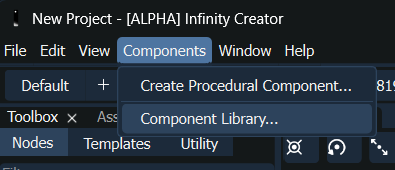
Click 'Component Library...' in the Components menu
- Import Component
- Click "Import Component..." button at the top of the Component Library dialog
- Select your component's install directory (e.g. **"DeformableSphereInstall"**)
- Click "Open" (the system will copy the component into your project)
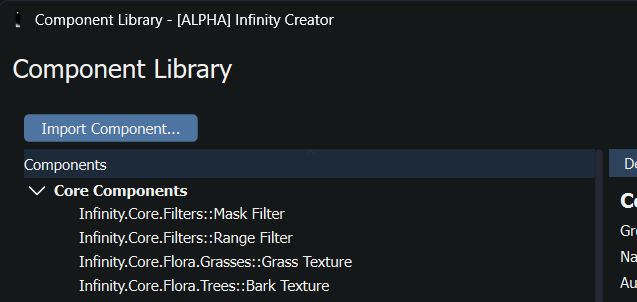
Click the 'Import Component...' button
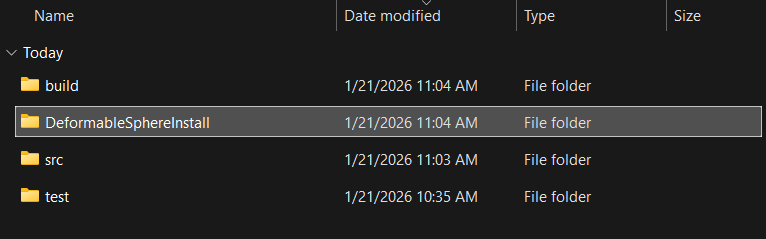
Choose your component's install folder
- Component Available in Toolbox
- Your Deformable Sphere component will now appear in the Toolbox
- It will be organized under the "Tutorial.Components" group
- You can drag it into your system like any built-in component
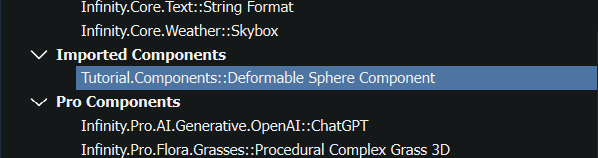
The imported component visible in the component library
For detailed guidance on using imported components and building systems, refer to the Infinity Creator Manual.
Using Your Component in a System
- Drag the Deformable Sphere component from the Toolbox into the Procedural Graph view
- Connect inputs such as integer constants for Subdivisions, float constants for Scale, etc.
- Connect outputs to other components like mesh renderers or file exporters
- Test execution by running the system within the Creator
Step 9: Deployment
When you deploy a system using your custom component:
- Automatic Inclusion: The component's shared library will be automatically included in the deployment
- Distribution: All necessary component files are copied to the deployment directory
- Dependencies: The Infinity Engine runtime will automatically load your component when the system executes
Advanced Features
Using PRNG Distributions
For more sophisticated randomization, use the built-in distribution classes:
void DeformableSphere::advancedNoiseExample()
{
for (auto& vertex : mesh.vertexBuffer.positions) {
float normalNoise = normalDist(prng);
float gammaVariation = gammaDist(prng);
}
}
Platform-independent gamma distribution.
Definition PRNGDistribution.hpp:1098
Platform-independent normal (Gaussian) distribution.
Definition PRNGDistribution.hpp:524
Component Properties and Configuration
You can extend your component.yaml with more sophisticated input definitions:
in:
- name: NoiseType
type: string
default: "Perlin"
description: Type of noise to use for deformation
editor:
type: dropdown
options: ["Perlin", "Simplex", "Worley"]
- name: DeformationAxis
type: Vector3
default: [1.0, 1.0, 1.0]
description: Directional bias for deformation
- name: EnableUVUnwrapping
type: bool
default: true
description: Whether to generate UV coordinates
Troubleshooting
Build fails:
- Verify the Infinity SDK is properly installed
- Check CMakeLists.txt paths and library names
- Ensure C++17 standard is supported by your compiler
Component not found in Creator:
- Verify component.yaml syntax and plugin-name
- Check that the shared library was built successfully
- Ensure component import completed without errors
Runtime execution errors:
- Check component logging output for error messages
- Verify input types match component.yaml definitions
- Use try-catch blocks around potentially failing operations
Inconsistent results:
- Ensure you're using the component's PRNG for randomization
- Verify seed handling is correct
- Check that all random operations are deterministic
Best Practices
- Validate inputs thoroughly to prevent crashes
- Use logging to help debug component behavior
- Write comprehensive tests for different input scenarios
- Document your component clearly in the YAML description
- Follow consistent naming conventions for inputs/outputs
- Handle edge cases gracefully (empty inputs, extreme values)
- Use the component PRNG for all randomization
- Optimize for performance in frequently-used components
- Create meaningful icons to improve user experience
- Version your components appropriately
Next Steps
Now that you've created your first component:
- Learn about Random Number Generation and Distributions for advanced randomization
- Explore more complex mesh operations and data structures in the Types API
- Study built-in components for patterns and advanced techniques
- Create component libraries for related functionality
- Build complete systems that showcase your custom components
For comprehensive guidance on component development and the Creator interface, visit the Infinity Creator Manual.